Bag Printing Singapore — Artwork Setup, File Specs & Logo Placement Guide for Custom Bags (2026)
A perfectly designed logo is worth nothing on a bag if the file is supplied as a 72 dpi screenshot, the Pantone code is missing, and the placement coordinates were "just put it in the middle." This guide is the cross-bag artwork prep manual that Singapore designers, marketing managers, and procurement teams should keep open the first time they brief a bag printer. It covers exactly what file formats work, where logos actually belong on each bag type, how to handle dark vs light bag colours, and how to set up artwork that prints clean on the first run.
In this artwork prep guide
Accepted file formats · vector vs raster · resolution and print size math · Pantone colour callouts · logo placement zones for tote, drawstring, backpack, sling, cooler, pouch, laptop bag, jute, paper · safe areas and bleeds · light vs dark bag rules · mockup approval · common artwork mistakes.
Accepted file formats — and what each one is for
Singapore bag printers accept a tight list of file formats, and each format has a specific job. Sending the wrong format is the single most common reason an order goes back into queue.
.AI (Adobe Illustrator) — gold standard for silkscreen, embroidery digitising and Pantone-matched work. Supply with all fonts converted to outlines.
.EPS (Encapsulated PostScript) — equivalent to AI for older systems. Same outline-fonts requirement.
.PDF (vector PDF, not flattened image) — universally accepted; safest format if you’re not sure what your designer used.
.SVG — accepted for digital print methods (DTF, heat transfer, sublimation). Some embroidery software needs additional conversion.
.PNG (transparent background) — only acceptable if supplied at 300 dpi at the actual printed size. Never accepted for silkscreen.
.JPEG — discouraged. Use only as a colour reference, never as the artwork master.
Vector vs raster — and why the print method decides
Vector files (AI, EPS, PDF, SVG) describe shapes mathematically and scale infinitely without losing quality. Raster files (PNG, JPEG, TIFF) are made of pixels and degrade when stretched. The print method on your bag dictates which one is mandatory.
Silkscreen printing: vector required. The printer cuts a physical screen from the file and any pixelation becomes permanent.
Embroidery: vector strongly preferred — the digitising software traces vector paths into stitch paths. Raster art adds 1–2 days for manual tracing.
Heat transfer (CAD-cut vinyl): vector required for cut paths.
DTF (direct-to-film): raster acceptable at 300 dpi at print size; vector preferred for sharp edges.
Sublimation (full-print): raster acceptable at 300 dpi at print size; vector preferred for type and brand marks.
Resolution and print size — the math you cannot skip
If you only have a raster logo, the only number that matters is "dpi at the actual printed size on the bag." A logo file that looks crisp on your screen at 1,200 pixels wide will look fuzzy if printed at 25cm wide on a tote, because at 25cm you only get 122 dpi — half of what’s needed. The rule is simple: at 300 dpi, every centimetre of printed width needs 118 pixels of source. So a logo printed at 20cm wide needs at least 2,360 pixels of source resolution.
Printed at 5cm wide: minimum 590 px source.
Printed at 10cm wide: minimum 1,180 px source.
Printed at 15cm wide: minimum 1,770 px source.
Printed at 20cm wide: minimum 2,360 px source.
Printed at 25cm wide: minimum 2,950 px source.
Pantone colour callouts — the right way
If your brand has a Pantone code, use it. "Make it match our website red" is not a colour spec. Pantone codes come in three flavours that you need to specify: PMS C (Coated, used for inks on coated paper or smooth fabric), PMS U (Uncoated, used for natural canvas and uncoated papers), and TPX (Textile Paper eXtended, used for dyed fabric). Most cotton tote and drawstring bags use PMS U values for ink and TPX for the body fabric. The cleanest way to communicate this is to embed the Pantone codes inside the file name itself — for example, "company_logo_PantoneU186_white.ai" tells the printer everything in one glance.
Logo placement zones by bag type
Every bag category has a sweet-spot print zone where the logo lands clean, doesn’t fight with seams, and photographs well in product shots. Place logos outside these zones at your peril — too close to the bottom and the logo distorts when the bag is loaded; too close to the strap and embroidery hoops can’t reach.
Cotton/canvas tote bag: centred horizontally, 8–10cm down from the top opening, max 25cm × 18cm print area.
Non-woven shopping bag: centred 6cm down from top, max 28cm × 20cm — non-woven accepts the largest single print area in the category.
Drawstring sport sack: centred 10cm down from drawstring channel, max 22cm × 18cm. Avoid the channel itself.
RPET foldable shopper: upper centre, 5cm from top, max 18cm × 12cm. The fold line is the hard limit.
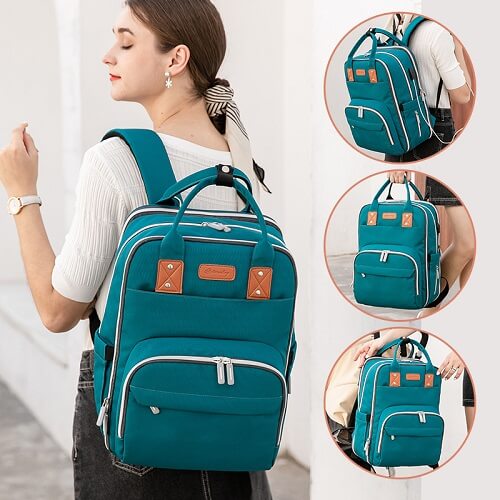
Backpack: centred upper panel below the top zip, max 15cm × 12cm. Avoid pockets and seam lines.
Sling/crossbody bag: small front-flap placement, max 10cm × 6cm — sling bags are too compact for large logos.
Cooler bag: centred front panel, 6cm down from the top, max 22cm × 16cm. The insulated layer slightly limits print depth.
Toiletry pouch: centred or off-centre top, max 15cm × 8cm.
Laptop bag/messenger: upper-left or centre front flap, max 18cm × 10cm.
Jute tote: centred 8cm down, max 22cm × 16cm. Embroidery is preferred over silkscreen on jute.
Paper bag (kraft or art card): centred or upper-left, max width = bag width minus 4cm. Avoid the gusset crease.
Safe areas, bleeds and seam clearance
Three terms you’ll see on every printer’s artwork brief: safe area, bleed, and seam clearance. Safe area is the inner zone where critical text and logo elements must stay — keep at least 1cm padding on all sides. Bleed is the extra colour area that extends beyond the trim line so a slight cutting drift doesn’t reveal the bag fabric — usually 3mm. Seam clearance is the minimum distance your artwork must stay from any stitched seam — 2cm is the safe rule; closer than that and the print can wrap, distort, or peel where the needle holes pierce the fabric.
Light bag vs dark bag — two completely different artwork rules
Light-coloured bags (natural canvas, white, cream, light grey): Standard ink colours print directly onto the fabric. Supply your normal full-colour logo. No special preparation needed beyond Pantone callouts.
Dark-coloured bags (black, navy, dark green, burgundy): Light inks need a white "underbase" printed first to stop the bag colour bleeding through and dulling the ink. This means: (a) supply a separate "reverse" or "knockout" version of your logo where any white elements are converted to solid white, and (b) expect a slightly thicker print feel because of the underbase layer. Always supply BOTH a positive logo and a reverse/white logo when ordering dark bags.
The mockup approval moment
After artwork submission, you’ll receive a digital mockup — a photoreal render of your logo placed on a stock photo of the actual bag. This is the last point in the workflow where mistakes are free to fix. Inspect:
Spelling. All of it. The brand name, the tagline, the year, the URL.
Logo size in centimetres. Mockups can deceive. Ask for the print width in cm to be labelled.
Position relative to seams and the top opening. Confirm the centimetre offsets.
Colour rendering. Mockups show approximate colour. Refer back to your Pantone codes for the source of truth.
Reverse-version handling on dark bags. Confirm that white underbase has been applied if needed.
Always do this approval on a desktop monitor, not a phone. Phone screens compress small text and slightly shift colour temperature, hiding mistakes that you only notice when 300 finished bags arrive.
Common artwork mistakes (and the production cost of each)
Sending a JPEG of a vector logo. Costs 1 day while the printer asks for the master file.
Fonts not converted to outlines. Costs 1–2 days while the printer requests the font or substitutes one.
Logo placed in the seam zone. Either the printer pulls the logo (delaying approval) or proceeds and risks ink cracking at the seam.
Missing reverse version on a dark bag. Costs 1 day; can also force a print method change if the deadline is tight.
Pantone callouts as "same as our brochure". Forces the printer to guess; usually results in a Pantone-adjacent colour that the marketing team rejects on delivery.
Approving the mockup on a phone. Costs nothing visible — until 300 bags arrive with a typo nobody caught.
Spend 30 minutes preparing your artwork properly and you save 3–5 days of back-and-forth on every bag order. Pair this artwork prep with the workflow in our digital ordering walkthrough — the bag printing Singapore hub catalogues every bag type and its print-area dimensions, and when you’re ready to push the order through, simply request a custom bags quote in Singapore with your prepared artwork attached.
Frequently asked questions
What file format is best for printing on a custom bag?
A vector file in AI, EPS, PDF or SVG format, with all fonts converted to outlines, is the gold standard for any silkscreen, embroidery or heat-transfer print job in Singapore.
Can I use a PNG for bag printing?
Yes — but only if the PNG is 300 dpi at the exact printed size on the bag, has a transparent background, and the print method is DTF, sublimation or heat transfer. PNG is never acceptable for silkscreen.
How big can a logo be on a tote bag?
Most cotton canvas totes accept up to 25cm wide × 18cm tall in the centred upper zone. Non-woven shopping bags accept slightly larger — up to 28cm × 20cm — because the panel is uninterrupted by stitching.
Why does my logo need a separate white version for dark bags?
Light inks printed onto dark fabric require a white underbase layer to prevent the dark colour bleeding through. The reverse/white version of your logo tells the printer exactly where to lay that underbase.
How many revision rounds do I get on the mockup?
Most Singapore bag printers include one round of revisions free. Additional rounds may carry a small fee, especially when artwork changes require re-cutting silkscreen frames or re-digitising embroidery files.
Got your artwork ready? Get a quote.
Upload your prepared file, choose a bag type, and we’ll send a digital mockup within one working day.